
CRE Connect Architecture
CRE Connect (CREC) gives applications one API and one Go SDK for three chain-facing tasks: watch on-chain events, execute gas-less operations, and run one-shot chain queries. Chainlink runs the DON infrastructure behind that API.
A Chainlink Decentralized Oracle Network (DON) is a group of independent Chainlink nodes. In CRE Connect, DONs observe contract logs, produce signed reports, and submit transactions through Smart Accounts.
CRE Connect uses CRE (Chainlink Runtime Environment) to coordinate that work. Your application only talks to the CRE Connect Go SDK or the CRE Connect REST API.
How CRE Connect fits together
CRE Connect is a closed loop. Your application sends requests to the SDK or REST API. Chainlink DONs watch chains, execute operations, and send signed events or query results back through the same API.
The diagram below shows the shared components:
- Events: a Watcher monitors contract logs and returns
watcher.eventrecords with OCR proofs. - Operations: your app submits an EIP-712-signed Operation, and the DON broadcasts the resulting transaction through your Smart Account.
- Queries: your app submits a read-only EVM call, and the DON returns a signed query result.
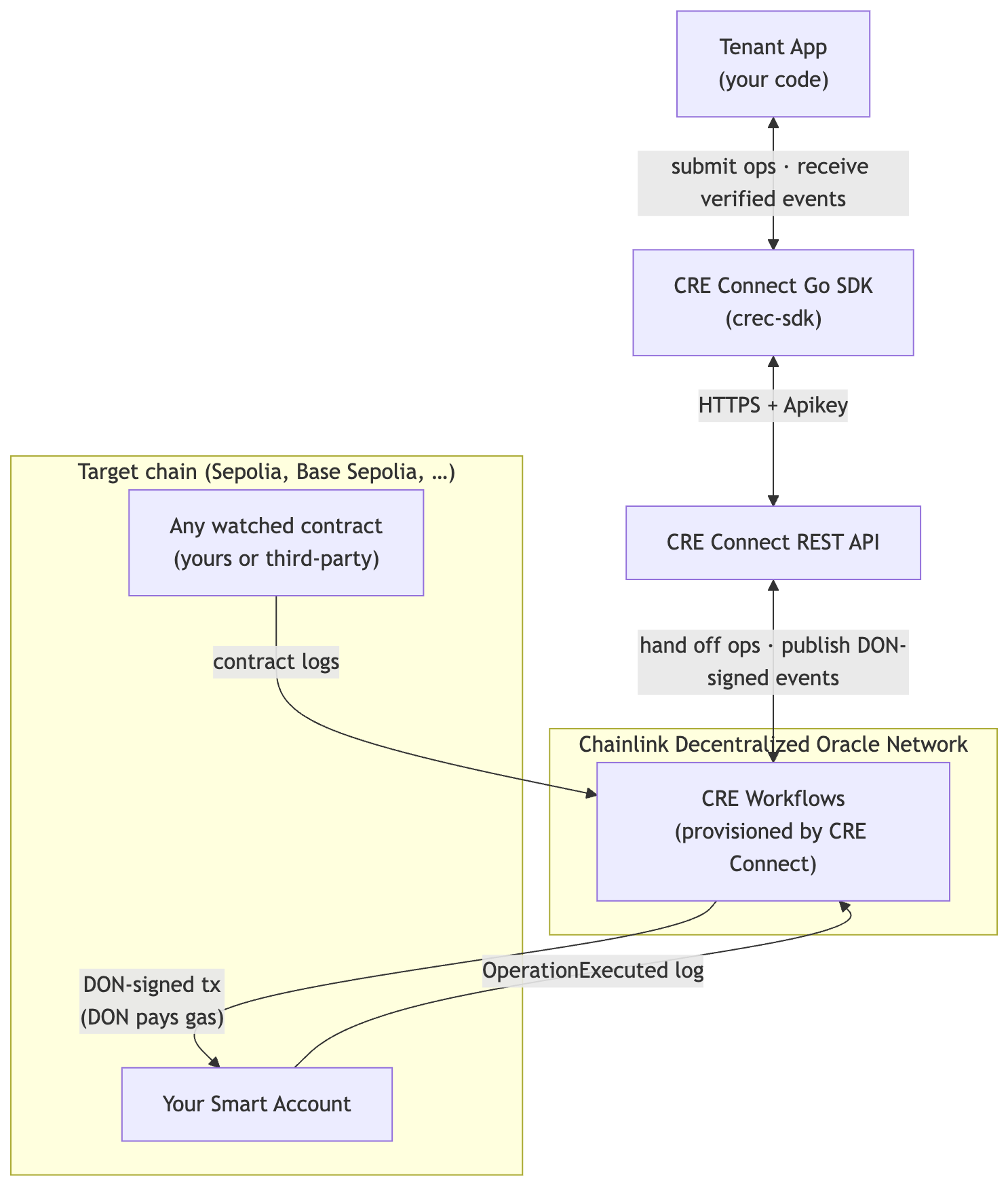
How to read it:
- The top layers, App, SDK, and REST API, are the same for every interaction.
- Your Smart Account is the on-chain account that executes Operations.
- Watched contracts are contracts you point a Watcher at. They can be your contracts, partner contracts, or public protocol contracts.
- CRE workflows run inside the Chainlink Runtime Environment. CRE Connect manages them for you.
The Go SDK (crec-sdk)
The SDK is the application's entry point. A single crec.Client exposes resource-oriented sub-clients:
client.Channels: create and manage Channels.client.Watchers: create and manage Watchers.client.Events: poll, search, and verify Events.client.Transact: build, sign, and submit Operations.client.Wallets: provision and manage Smart Accounts.client.Queries: submit one-shot, DON-backed Chain Queries.
Construction is a single call:
client, err := crec.NewClient(
    "https://cre-connect.api.chain.link/v1",
    os.Getenv("CREC_API_KEY"),
    crec.WithOrgID(os.Getenv("CREC_ORG_ID")),
)
By default, the client is configured with DefaultMinRequiredSignatures = 4 and the DefaultValidSigners set published by Chainlink Labs. Both are configurable through SDK options.
The CRE Connect REST API
The CRE Connect REST API is the public entry point for every interaction with the platform. The SDK (or any direct REST client) talks to it over HTTPS at https://cre-connect.api.chain.link/v1, authenticated with Authorization: Apikey <API_KEY>. The full surface is documented in the REST API Reference and the Swagger explorer.
How operations, events, and queries work
CRE Connect manages the CRE workflows that interact with Chainlink DONs. You do not write or deploy those workflows yourself.
| Task | What happens |
|---|---|
| Watch events | A Watcher monitors a contract on a supported chain. When a matching log reaches the configured confidence level, CRE Connect returns a watcher.event with an OCR proof. |
| Execute operations | Your application submits an Operation through the SDK or REST API. The DON broadcasts the transaction through your Smart Account, and CRE Connect returns operation.status events as the operation progresses. |
| Run queries | Your application submits an evm_call query. The DON executes the read against the selected block and returns a query.status result with the resolved block metadata. |
Extensions such as DTA contribute pre-packaged operation builders and watcher definitions for supported protocols.
See Watchers, Operations, and Chain Queries for the resource-specific models.
Smart Accounts on-chain
Operations execute through a Smart Account contract deployed per tenant, per chain, per wallet. This contract:
- Verifies the EIP-712 signature attached to each Operation against an allow-list of approved signer keys (ECDSA or RSA), configured at wallet creation time.
- Executes each
Transaction(to,value,data) atomically. The Operation succeeds or fails as a single unit. - Emits an
OperationExecutedlog that CRE Connect picks up and turns into a verifiableoperation.statusevent you can read throughclient.Events.
The Smart Account is not an ERC-4337 account. It is a Chainlink-native contract whose authorization model is rooted in the EIP-712 domain CLLSmartAccount (see EIP-712 Signing). The DON acts as the relayer and pays gas for the on-chain execution, giving applications a fully gas-less developer experience (see Account Abstraction & Gas Sponsorship).
Resources and lifecycles
Every interaction in CRE Connect is scoped to one of these resource types:
| Resource | Purpose | Lifecycle states |
|---|---|---|
| Channel | Logical scope for watchers, wallets, operations, queries, and the event stream. | active, archived |
| Watcher | On-chain event monitor backed by CRE Connect. | pending, active, failed, archiving, archived |
| Wallet | Smart Account configuration with allowed signers. | pending, deploying, deployed, archived, failed |
| Event | Immutable record for watcher events, lifecycle updates, and query results. | n/a |
| Operation | EIP-712-authorized batch of EVM transactions. Draft operations can wait for a signature before execution. | pending_signature, accepted, sending, sent, broadcasting, confirmed_latest, confirmed_safe, confirmed, terminal states |
| Query | One-shot, read-only EVM call against a selected block. | accepted, sending, sent, completed, failed, expired |
Every state transition in the table is observable through client.Events, which means your application can react to any lifecycle change with the same verifiable event pipeline it uses for on-chain data. See Lifecycles for the full state machines.
Related
- Channels · Watchers · Smart Accounts · Operations: every component in detail.
- Verifiable Events: what makes an event "verifiable" in this architecture.
- Chain Queries: one-shot, DON-backed reads.
- Getting Started: turn the model into running code.