
Manage Watcher Lifecycle
Once a watcher is created (see Create with Service or Create with ABI), you can list, filter, rename, and archive it.
Status reference
A watcher moves through these states:
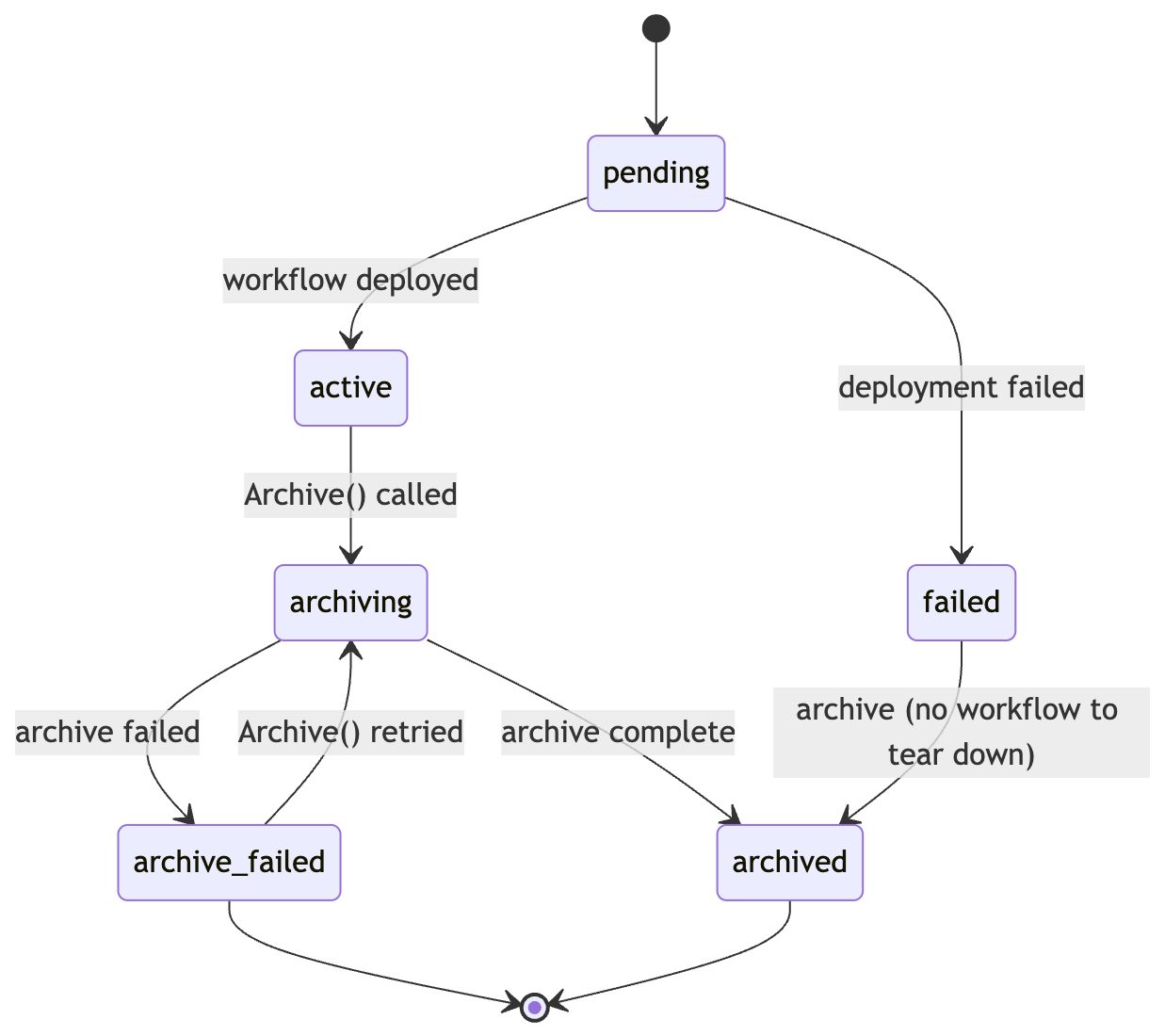
The entity statuses surfaced by the REST API are pending, active, archiving, archived, and failed (the API maps internal archive_failed to failed on the entity response). The richer archive_failed state is visible on the watcher.status event payload (apiClient.WatcherEventStatus).
List and filter
The Watchers tab on the channel page lists every watcher with its status. Use the Service, Network, and Status filters to narrow the view.
Go SDK
import (
    apiClient "github.com/smartcontractkit/crec-api-go/client"
    "github.com/smartcontractkit/crec-sdk/watchers"
)

active := []apiClient.WatcherStatus{apiClient.WatcherStatusActive}
limit := 50

list, err := client.Watchers.List(ctx, channelID, watchers.ListFilters{
    Status:        &active,
    ChainSelector: ptr("16015286601757825753"),
    EventName:     ptr("Transfer"),
    Limit:         &limit,
})
curl
curl -sS "$CREC_BASE_URL/channels/$CHANNEL_ID/watchers?status=active&chain_selector=16015286601757825753&limit=50" \
  -H "Authorization: Apikey $CREC_API_KEY"
Available filter fields on ListFilters:
| Field | Notes |
|---|---|
Limit / Offset | Pagination; check HasMore. |
Name | Substring match on watcher name. |
Status | Slice of apiClient.WatcherStatus. |
ChainSelector | Filter by chain. |
Address | Filter by contract address. |
Service | Slice of service names (e.g. ["dta.v2"]). |
EventName | Filter watchers subscribed to a specific event. |
Get a single watcher
w, err := client.Watchers.Get(ctx, channelID, watcherID)
if errors.Is(err, watchers.ErrWatcherNotFound) {
    // 404: surface to caller
}
The watcher's Status, ChainSelector, Address, and (for service watchers) Service are all returned in the response. The StatusReason is not part of the entity response; subscribe to watcher.status events on the channel to receive the human-readable reason whenever the status changes.
Update metadata (name only)
The SDK only supports updating the watcher name. Address, ABI, service, and chain selector are immutable; create a new watcher to change them.
Open the watcher detail panel and click the pencil icon next to the name to rename it inline.
updated, err := client.Watchers.Update(ctx, channelID, watcherID, watchers.UpdateInput{
    Name: "renamed-watcher",
})
curl -sS -X PATCH "$CREC_BASE_URL/channels/$CHANNEL_ID/watchers/$WATCHER_ID" \
  -H "Authorization: Apikey $CREC_API_KEY" \
  -H "Content-Type: application/json" \
  -d '{"name":"renamed-watcher"}'
Archive
Archiving is asynchronous. The PATCH returns HTTP 202 with the watcher in archiving; you must poll until it reaches archived or archive_failed.
Click the ⋯ menu on the watcher row and select Archive, then confirm. The status will transition to archiving immediately and to archived shortly after.
Go SDK
queued, err := client.Watchers.Archive(ctx, channelID, watcherID)
if err != nil {
    return err
}
fmt.Println(queued.Status) // -> archiving

if err := client.Watchers.WaitForArchived(ctx, channelID, watcherID, 60*time.Second); err != nil {
    return err
}
curl
curl -sS -X PATCH "$CREC_BASE_URL/channels/$CHANNEL_ID/watchers/$WATCHER_ID" \
  -H "Authorization: Apikey $CREC_API_KEY" \
  -H "Content-Type: application/json" \
  -d '{"status":"archived"}'
# -> 202 Accepted, body contains watcher with status "archiving"
WaitForArchived returns watchers.ErrWaitForArchivedTimeout if the deadline elapses. If the watcher transitions back to active/pending/failed instead of archived, it returns watchers.ErrWatcherArchiveFailed: investigate the workflow's logs and retry.
Handling failure states
| Sentinel error | Returned by | Recovery |
|---|---|---|
watchers.ErrWatcherDeploymentFailed | WaitForActive | Archive, then re-create; check service config and address. |
watchers.ErrWatcherIsArchiving | WaitForActive | Someone archived concurrently; wait for WaitForArchived. |
watchers.ErrWatcherAlreadyArchived | WaitForActive | Archived watchers cannot return to active; create a new one. |
watchers.ErrWatcherArchiveFailed | WaitForArchived | Subscribe to the watcher.status event on the channel to read the StatusReason, then retry the archive once. |
Transient vs. permanent errors
WaitForActive and WaitForArchived both invoke the SDK's isTransientError helper. Transient errors (HTTP 429, 5xx, network timeouts, broken pipes) are silently retried at the configured poll interval. Permanent errors (validation, ctx.Done(), 4xx other than 429) abort the wait immediately.
For details on tuning the poll interval and consistency window, see SDK Configuration.
Next steps
- Poll and Search Events: how the active watcher delivers data.
- Lifecycles: full state machines for watchers, wallets, and operations.